
Connect your storage.
Plug in compatible storage and choose a backup folder through Files. Your archive stays in that location.
A little more peace of mind
Make room for a backup that’s yours.
Back up your iPhone photos and videos to a drive you choose. Keep originals, captured edits, and Live Photos together in an archive you control.
In development For iPhone, iOS 18+
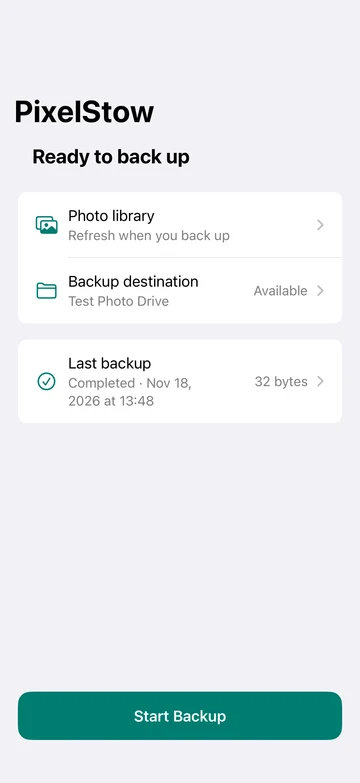
From your library to your drive
You decide when to back up, what to include, and where your memories live.
Plug in compatible storage and choose a backup folder through Files. Your archive stays in that location.
Include all accessible Photos items or a selection. Later backups save the new and changed media that needs updating.
Read the result, review issues, and run a separate verification when you want to check the archive.
A compatible drive, enough free space, and access to originals are required. Check the storage basics.
Keep the whole moment
The original. The crop you love. The little bit of motion that brings it back. A backup should account for all of them.
Explore Live Photos and editsNative original resources are saved in the formats Photos provides. Rendered edits are kept separately.
Supported Live Photos keep their paired image and video. A still alone isn’t a complete Live Photo.
Complete edit versions observed during backups stay associated with their originals.
Open ordinary media files on compatible storage. Keep the whole archive for app-managed restore.
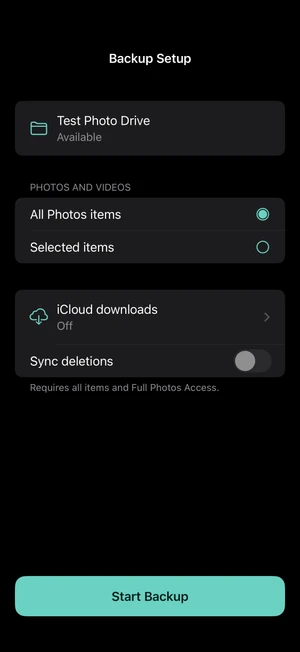
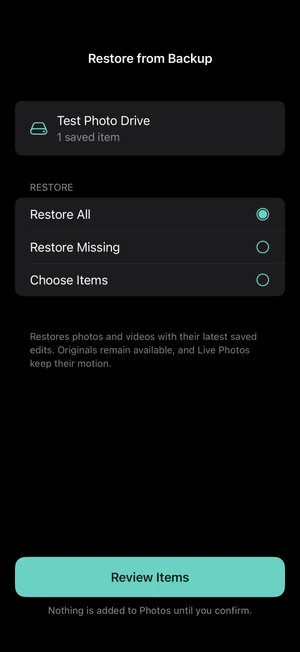
A backup you can come back to
A copy is only part of the story. PixelStow gives you a report of the work, a way to check saved files, and a supported route back into Photos.
Supported media and resource combinations apply. Restore does not recreate albums or the entire Photos database. Background continuation depends on iOS and storage access.
Simple by design
A proposed one-time purchase.
Your own storage, without a PixelStow storage subscription.
Start with a free backup
$0
Make your first copy, then try keeping it up to date.
PixelStow Lifetime
Proposed for launch$4.99 one time
Unlock unlimited future backups with a one-time purchase.
Proposed launch offer, not a current sale. Three free successful backups and US $4.99 Lifetime are subject to confirmation. The development app may differ; the released app will display the final allowance and localized App Store price. Storage is purchased separately. No-change checks and eligible repairs do not use another successful backup.
A little backup knowledge
Getting started · 7 min read
What you need, how to make a copy, and what to check before you trust it.
Read the guideBackup basics · 6 min read
Understand the difference between a synced library and an independent copy.
Read the guidePhoto preservation · 7 min read
Keep motion, originals, and saved edits together when you back up.
Read the guideA few good questions
The practical details, without the fine-print feeling.
Visit supportPixelStow is in development. There is no public App Store download linked here yet. Early access is an expression of interest, not a purchase or a guarantee of an invitation.
Compatible USB-connected storage is the primary use case. PixelStow asks you to choose a folder through Files. Your iPhone, cable, power supply, drive format and available space all matter. A location appearing in Files does not certify it for backup. NAS, SMB and third-party providers need separate compatibility testing; iCloud Drive is not a supported backup destination.
PixelStow keeps the original still and motion resources together and retains complete edit versions captured during backups. Supported restore selects the latest complete saved appearance with its originals. Some Live Photo effects and resource combinations are unsupported and must be reported. It does not record every edit between backups or recreate every editing step.
It can give you an independent copy on storage you choose. iCloud Photos keeps your library in sync across devices; PixelStow is for a user-started archive. You can use both. If originals are only in iCloud, backup needs permission to download them, internet access and sufficient iPhone space.
PixelStow can request continued background processing, but iOS decides whether to allow it. Storage access must remain available. If work pauses, you can resume completed progress. There is no unattended backup schedule, and locking or disconnecting your phone can affect the operation.
The proposed launch offer is three successful backups that save new or changed media, then a US $4.99 one-time Lifetime unlock for unlimited future backups. This offer is not final; the development build may differ and the app will show the final allowance and localized Apple price. Existing backup reports, verification and supported restore remain accessible after the free allowance.
No. PixelStow stores ordinary media files, supporting files and a catalog in the selected location without adding its own encryption or password. Choose and protect your storage accordingly. No PixelStow account or PixelStow-hosted media storage is required.
Backup does not delete your Photos items. Before you manually remove anything, check the report, verify the archive, test a supported restore and keep another independent copy. Deleting an item in iCloud Photos can also remove it from other synced devices. PixelStow is not a phone-cleanup tool.
For the moments worth keeping
Follow PixelStow’s progress toward early access.